Start here
Drawquarium save file location: backup, Steam Cloud and transfer
Drawquarium’s fish are not just save data; they are drawings. The safest backup is the source art, with the save folder and Steam Cloud as a second layer.
The exact save path has not been published by the developer. A launch-day player reports that the demo save lives in the Windows AppData folder and that the full game loaded it automatically. That is enough to build a safe backup routine, but not enough to give you a precise path we have not verified.
Where the save lives
| Item | Status |
|---|---|
| Windows AppData save | Reported by a launch-day player |
| Exact folder path | Not published |
| Steam Cloud (full game) | Listed |
| Demo save transfer | Confirmed; player reports automatic |
| Source PNGs | The reliable backup |
To find it, open %APPDATA% or %USERPROFILE%\AppData\LocalLow in File Explorer and search for
the game or developer name. Do not download a “save path” tool; the folder is ordinary Windows storage.
Steam Cloud
Steam Cloud is listed for the full game. It is the easiest backup for normal play, but it is not a version history you control. If a local save is overwritten, Cloud may sync the new state. Keep your own copy before reinstalling, moving PCs or testing a big change.
How to back up
- Close the game. Do not copy a save while it is being written.
- Copy the game’s AppData folder to a separate drive or cloud folder.
- Copy your source PNGs — every fish, plant and food drawing you imported.
- Take screenshots of the tank list and the profile of any fish whose name or age matters.
- Note the date in the backup folder name, for example
drawquarium-backup-2026-11-14.
If the save is lost, the source art can rebuild the look. It cannot rebuild age, level or relationships. That is why the save folder matters even if you have the PNGs.
Restore or move to a new PC
- Install Steam and Drawquarium on the new PC.
- Launch the game once so it creates its folders.
- Close the game.
- Copy the backed-up AppData folder into the same location.
- Launch and check the aquarium list and one fish profile.
- If Steam Cloud asks which copy to use, choose the one with the newer date only after checking both.
Demo save transfer
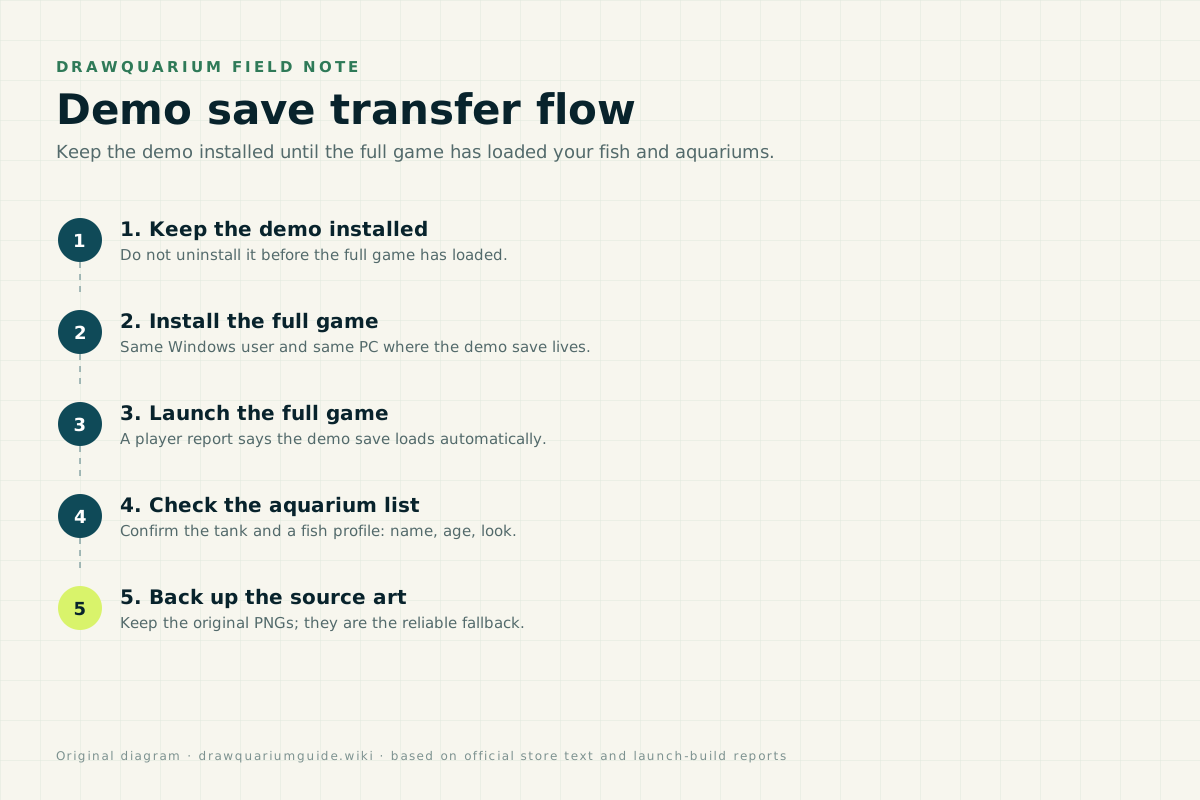
The developer FAQ says demo fish and aquariums carry over, and a launch-day player reports the full game loading the demo save automatically. Keep the demo installed until you have checked the tank in the full game. The dedicated save-transfer guide has the full order.
Save file FAQ
Where is the Drawquarium save file?
Players report that the demo save lives in the Windows AppData folder. The developer has not published the exact publisher folder path, so search AppData for the game folder rather than using a guessed path. Steam Cloud is listed for the full game.
Does Drawquarium use Steam Cloud?
Yes, Steam Cloud is listed for the full game. The demo’s local AppData save is the part that needs care before you uninstall the demo.
Can I back up my fish?
Keep the original PNGs for every fish and plant you care about, plus a screenshot of the tank and fish profiles. The game’s save folder is a second backup, not the only one.
What happens if I uninstall the demo?
The developer says demo fish and aquariums carry over, and a player reports the full game loading the demo save automatically. Keep the demo installed until the full game has loaded your tank, then back up before removing anything.
Should I rename save or texture files?
No. The developer specifically asks players not to rename texture files by hand. The one exception is the recovery trick for a deleted aquarium’s `png_byebye` texture, which is documented in the clone/restore guide.
Advertisement
Sources for this page
Checked November 16, 2026Listed claims on this page were checked against the records below. If a detail is not in these records, it is labelled as unconfirmed rather than presented as fact.
- 01 Drawquarium FAQ (developer thread) — rokaplay / Steam Community (developer)
Pinned November 10, 2026 FAQ, rechecked after launch: demo fish and aquariums carry over, no achievements yet, Linux/Steam Deck not officially supported, PNG import guidance (850×850 for a big fish), no layers, pressure settings, zoom and colour shortcuts, clone instead of rename, plants unlock from a ground fish, pause while drawing if it slows down, and how to leave feeding mode.
- 02 How to transfer aquarium from demo? (player reply) — Steam Community
Launch-day player report says the full game loaded the demo save automatically and that demo save data remains in the AppData folder. A player report, not an official migration guide.
- 03 Drawquarium on Steam — Valve / byKaleb / rokaplay
Store description, release date, languages, features, requirements, tags, bundles and platform list. Checked November 16, 2026: released November 13; $9.59 with a 20% introductory offer ending November 27; Steam Deck Playable; 17 screenshots; two trailers; eight bundles; Steam Cloud, Family Sharing and single-player listed; no achievements. The page shows Very Positive (325 reviews, 98% positive).
- 04 Drawquarium customer reviews on Steam — Steam Community
Review snapshots: launch evening (21:30 UTC, November 13) was Very Positive with 100% of 57 Steam-purchaser reviews positive. On November 16 the page showed Very Positive with 98% of 325 Steam-purchaser reviews positive, 359 total including key activations and 6 negative. Reviews describe PNG import, feeding behaviours, cleaning, breeding, moving fish between aquariums, performance and multi-monitor Wallpaper Mode.
Read how we classify evidence in our editorial policy.
Quick status